Sunday, May 30, 2010

Remember, the Nearest Exit May Be Behind You - Learning About Safety from the Private Sector

Before I started a workshop recently, I checked both of the Fire Exit doors to make sure they were not locked (believe me, it happens). I also roamed around outside the workshop room to find the fire extinguisher, which I knew was there somewhere (under a table - in plain sight if you are 1 meter tall or less). I also checked with the building maintenance team to see where the rally points were in case of evacuation.

These are things I do regularly now when I work in a new venue, and check again in familiar ones. Then I'll start my facilitation work with a group by reminding them of these safety features, often before we get to the objectives of our day. Sometimes I format this information as quiz questions, to keep it light yet still draw their attention to it - it's amazing how many people don't remember these features in their own buildings. (I'll admit that I didn't either!)

This practice is drawn directly from my work with companies. In the past few years I've worked more and more with large private sector groups, many representing heavy industry, in and around their own buildings. Many businesses will start their meetings with a reminder of this information. In some cases they might do something more substantial called "Safety Shares", or "Health and Safety Shares." I even worked in one company HQ that asked visitors to watch a video about building safety in the reception area before they were able to enter the work space for our meeting (where they then still got the Health and Safety Share).

The Health and Safety Shares that I saw were interesting in that they provided opportunities to show statistics about some aspect of safety in the company or in the country/region where it is located. For example, in one workshop a company participant lead the Health and Safety Share with statistics on how many people have accidents from falling down staircases (one UK report stated that 28,602 people were hospitalised for falling down stairs in 2007-2008). This statistic supported the company's stringent rule (signs everywhere) for holding handrails on the staircases in all the buildings and installations - an earnest rule that sometimes made visitors smile.

In that particular workshop, which was cross-sectoral and focused on sustainability, we brought in the "E" of "HS&E" which is now what many companies have renamed their Health and Safety departments (Health, Safety & Environment). After the staircase information another participant added some statistics about how many plastic bottles are being used, to sensitise people people about waste (15 million plastics bottles are used each day in the UK!) This was presented by one of the NGO participants as the "Environment" part of the "HS&E Share" and framed as a way to help society "hold the earth's handrail." It was both clever and profound as a way to interpret HS&E in today's corporate social responsibility environment.

These Shares might also be complemented by inputs from the participants on things that they see on their way to work - safety infractions or good practice - as a way to bring the messages into their daily life, rather than just norms that are followed at work. All in all, this kind of HS&E share took about 10 minutes before the workshop (we even started a little early to take this into account), and was an interesting and thoughtful way to bring both the practical personal safety aspect into the room (including how to get out of it, fast!), as well as to position the workshop discussion in a much wider social context.

If you look around you right now, do you know where the emergency exit is? A fire extinguisher? Your local recycling station?

Friday, May 28, 2010

Too Busy to Think?

It is far too easy to fall out of reflective practice when you get extremely busy. Like funding for learning, it might be one of the first things to go when resources get tight (at both the institutional and individual level).

Then you don't take the time to stop and think how you can do things better (not to mention why you are doing them and even if you should be doing them.) This can result in incredible ineffeciencies, not to mention actions that can create even more work and take more time because they have not been carefully considered. I queried this in a former post (Is Progress Made By Making Mistakes) because in addition to creating ineffeciencies, errors can come from not taking the time to think through your actions (e.g. putting petrol in your diesal car tank). These can in turn create more work for you, making you even more busy in the long run, with even less time available to think.

When we get busy we sometimes think that we can make progress by brute force, by throwing all our weight and muscle into something. If we want it enough we can just work as hard and as long as we can to make it happen. Then you get stuck in "doing mode" and can't stop.

The smart alternative, of course, is to stop and create space for reflection to help us identify those ineffeciencies and change our behaviour, change our surroundings, change the rules, change our system, so we can achieve our goals with less effort. But you cannot identify those points of leverage unless you can stop long enough and get up high enough to see the patterns.

You might need some tools to do that. This can be quite personal. Writing this blog helps me organize my thoughts, and when I get busy I really have to make myself write (asking myself "What am I learning?" or "What am I noticing?" or any number of other start questions, and then recording my response.) Other people write in physical journals, or they create images, stories or even songs that synthesize; tools from systems thinking can also help people reflect on dynamics and explore change scenarios when looking for guidance on what to do differently. There are also many kinesthetic techniques to support reflection. It doesn't really matter which, just pick one.

You can get too busy to think. And if you stick to that too long, you will even get too tired to think. And then, watch that car at your next fill-up.

Saturday, May 08, 2010

The Capacitator: I'll Be Back


Trainitation, Facilitaining?

When Lizzie and I went through the Certified Professional Facilitator process, there was a Trainer (with a capital T) in our group who didn't get through (e.g. didn't get certified). There was a clear division between training and facilitating to which the assessors were incredibly sensitive. I remember myself, in one of the oral interviews, getting caught out providing a rationale for a facilitation choice that was more about learning than about strictly moving the process to its product end. The IAF facilitation competency is to "minimize the influence on group outcomes".

Of course this is highly contextual and I can completely understand the need for complete neutrality in facilitation. And at the same time, what an opportunity a face-to-face get-together provides to help a group develop - to learn to work together and make them better, stronger, faster in their tasks. Especially if the group will be working together again in the future. And if people go to many meetings (and so many people do), and they get enough of this "learning" through their facilitated events, they will become Super Team Members, versed on group process, and practically emerging facilitators themselves.

Building learning into facilitation seems an excellent way to build the capacity of a group to handle its own dialogues, discussions and processes in the future. And it takes some directed learning built in to do it. I definitely observe in colleagues that we have worked with repeatedly in this way develop, over the years, an increased attention to process detail, to interactivity, relationship building, and to the design part of a meeting.

This does eventually put you out of a job as the facilitator, and I think that is fine. It depends on your goal of course - if your goal is to help advance the community generally, then adding learning into your facilitation is a good way to optimise investments made in meetings. And it still takes a while, and gives you an interesting metric (slightly counterintuitive). If you are watching closely and notice that one of your partners is gradually bringing their process design and facilitation in-house, and you are getting less call-outs, or perhaps get drawn in more for coaching team facilitators, then this is a sign that your facilitation is building capacity. As long as the team knows you are there for them and can always come back to support their process as needed. This development can only be a good sign, if you are a Capacitator.

(click on the arrow below to see what I mean...)

Thursday, May 06, 2010

From One Brain to Many: Can You Creatively Build 20 Presentations Into a Workshop?

I got a great question this morning from a fellow learning practitioner working at the UN in Geneva, asking for ideas about how to structure 20 short participant presentations over a 2-day workshop.

I wrote a blog post last month about using Pecha Kucha's and Ingnites for this kind of thing (see The End of Boring...), and went on to suggest how to use this in a workshop where people might not have prepared to try a new technique.

Why not let people choose between doing a Pecha Kucha and doing a poster for their 5-minute presentation. Tell them 50% can do one and the other will do the second technique. See if they self-select between the two after an introduction to the techniques.

For the Poster, tell people that they will have a flipchart size sheet, coloured markers/collage materials and their product will be photographed and shown on the big screen as a guide for their 5 minute talk. You can give them a word budget too if you wish - 10 words, 20 words - or you could have them pick a card and the card number gives them their word budget, so they will all be different. That gives them a little more drama, as their Pecha Kucha colleagues will experience.

Then give people time in the workshop to prepare themselves, say a 45 min or 1 hour prep period before the presentations start. And finally, put them into pairs to do this preparation work (even mix them, one poster person with a Pecha Kucha person). This pairing gives them some support and someone to bounce ideas off of, it also gives them a deep dive into someone else's work, and let's them experience the other technique they didn't choose. The one-hour investment in preparation time will be made up through the 5/6 minute presentation time frame (versus the 10-15 min per person they might have expected normally), and provides valuable relationship building time.

After the preparation time, set up the sequencing, let people pick a number between 1-20 out of a hat, which will give them their order. Then schedule them in 5 presentation blocks (that is roughly 45 min, with the transition times). After each of block of 5 presentations, plan on a reflection discussion for 10 minutes - what are people noticing about the presentations? What patterns are emerging, what might that mean for our topic X or Y. Change the questions for this reflection slightly each time for variety, as well as a useful opportunity to help move people's thinking on your topic. Pull out different things, about one aspect or another, or about what we can do with the new information we are getting (so how it contributes to our action, next steps, or other goal of your workshop.)

For timing within the overall workshop, it depends on what purpose these presentations serve. Are they briefing people on the other participants, on work between a previous meeting and this one, information on the activities of many different offices of members in a network? If so, then it would make sense to start this early, such as after coffee on Day 1 and finish after lunch the same day. Or perhaps it is on commitments ore personal action plans for the results of a longer workshop, in which case you will want that at the end. See when the information given is most useful for the work you are doing. With 20 of these, it would be important to work it around a break, coffee or lunch.

Other interesting presentation-linked techniques that I have seen recently (not linked to the above scenario, but cool anyways - I want to remember them in any case so I put them here!):

  • Give a "quiz" at the end of the presentations. This would also work for the 20 presentations referred to above. As people present, note down some of the key points, interesting facts, etc. Then at the end of the presentations, to start the discussion, ask the audience the quiz questions. Question by question, ask for the answers from the audience; then if desired, ask the speaker to complement this with (only a little!) additional information. This is also the way to focus the discussion on a certain line of inquiry if that is helpful for your workshop. You can also decide if you want to tell people in advance that there will be a quiz or not. If you do, you might get them to pay more attention to what they are hearing; surprising them will wake them up for the discussion. See what makes sense for the group.

  • Introducing speakers: Have the audience introduce them. Put up on the screen a photograph of the speakers (with their name and title if you want, or try it without and also ask the audience for their name and title) and walk down into the audience and ask people to introduce this person. Some people will have heard something about them, read an article, or met them, let the audience say a few words about the person and then ask the speaker if there is anything they would like to add. I saw this at the Battle of the Bloggers at Online Educa last year with an audience of about 150 and it worked brilliantly, and in the end the information got out.

What other interesting practice have you seen for making presentations powerful and memorable? What are the ways we can help people with brilliant ideas and thoughts in their heads share them with others in the most productive way?

Tuesday, May 04, 2010

Where Learning Practitioners Go to Learn: Online Educa

One of the most useful conferences I go to each year is Online Educa, held annually in Berlin in November/December. It's a gathering of several thousand people from all over the world who work, live and breathe technology-supported learning.

It follows a rather traditional format of plenary and parallel break-out sessions on a wide variety of topics. And at the same time, there is much tolerance for the truly weird and wonderful in terms of stories, cases and experiments in learning. Not only do they get top speakers to present in plenary - I have written in the past about big ideas presented there by George Siemens on Connectivism, for example, and Professor Sugata Mitra of the Hole in the Wall experiments in India - conceptually they are also really pushing the envelope when it comes to knowledge and new media. I remember first hearing about knowledge management in stock and flow terms here in 2006, and most recently of the future in cloud computing. I wrote a post this year with all the collected new ideas (for me) called Ahead of the Curve; I always have ample new ideas when I come away from one of these conferences.

This community is continually testing new techniques - here is where I used Twitter so successfully for social learning (see my post on the Two-Day Total Twitter Immersion), where I met Jay Cross first and learned about his paradigm-shifting work in informal learning, and met some of his colleagues from Internet Time (see my post on Follow the Leaders). It's where I experienced a Pecha Kucha, and saw a Panel using a backchannel (Backnoise.com) to "talk" to the audience. And where Jane Hart who runs the online Centre for Learning and Performance Technologies speaks, where university programmes talk about how they are using virtual worlds and mobile technology for learning. It is always an exciting two days.

I just received a "Call for Papers" message from the team that runs Online Educa asking me to post it on my blog, and in this particular case, I agreed - here you go! If you have an innovative learning process, or something to share, this is the place to go to interact with a trending learning community:


OEB 2010 Call for Papers Open Now

Online Educa Berlin, the largest global e-learning conference for the corporate, education and public service sectors, has opened its Call for Papers. Deadline for receipt of all proposals is 14 May 2010. The 16th edition of Online Educa Berlin will take place from 1-3 December 2010 at the Hotel InterContinental Berlin.

Under the banner of Learning for All, this year's conference looks for contributions relating to the four core themes: Learning Content, Learning About Learning, Learning Ecosystems and Learning Environments. Each of these themes should be explored within the context of either Institutional Learning, Workplace Learning or Lifelong Learning, or any combination of these three.

Online Educa Berlin is the key networking event for the international e-learning and technology-supported learning and training industry, bringing together more than 2000 learning professionals and newcomers from around the world.

For more information: www.online-educa.com/programme


Maybe I'll see you there!

Friday, April 30, 2010

If I Was a Word Cloud: Creating Your Visual Biography


We often get asked to introduce ourselves at the onset of a workshop or meeting, or at the beginning of a presentation. We may say a few words, or cram our entire CV on a PPT slide. What are some other, more creative ways to introduce ourselves?

If you want to give an impression of your experience in an interesting way, I really like the Wordle option. Go to http://www.wordle.net/. Now take a Word version of your Curriculum Vitae. Select all and copy your entire CV. Paste it into the box on Wordle, and in 1 minute you have a beautiful word cloud that you can screen shot and paste into a PPT slide. The word cloud emphasizes key words that are more frequently used, so you get a quick snapshot of who you are and what you do.

I heard about another cool tool last night called Personas, a data mining site created by the MIT Media Lab that is a part of the Metropathologies exhibit. It says it "scours the web for information and attempts to characterize the person". It produces an interesting visual and a final continuum with key words that best describe you (you have to try it to get the gist - it takes literally 2 minutes). This screen shot can be captured and popped into a PPT slide. Both of these are licensed under the Creative Commons licenses so can be shared, and used with attibution (so put the URL on your slide too).

Two interesting ways to give people insight into the innovative you.

Tuesday, April 27, 2010

Who's the Coach?

Tonight I went to a network meeting at 2, place du Chateau in Nyon. I had made plans at 20:30 to see Lizzie (my co-blogger) afterwards and was a little stressed when at 21:15 the speaker asked the group if he could go over by another 15 minutes. I surreptitiously texted Lizzie under my chair to see if this delay was going to be ok. When we finally gave the speaker his well-deserved round of applause, I ran down the steps out into the courtyard and hustled towards the lift to the car park.

As I dug around for my keys down the dark pathway, I passed an older couple walking. As I got closer, the woman quietly said to her companion in English, “Look. Isn’t that beautiful.”

Because it was English, and perhaps the tone of her voice, it made me pause and look up.

I stopped. What was in front of me was panoramic. And absolutely breath-taking.

An enormous full moon broke the clouds with broad bright bands that crossed the full span of Lake Geneva, from the far shore of France’s sharp outlines of the Alps, to where I was standing on the cobblestone pathway in front of the Chateau of Nyon. I was so surprised at this I gaped for a moment. I took out my phone to take a picture that would never, ever, do it justice. Then I walked slowly to the elevator to go down the three floors into the car park. At that point the couple had caught up with me.

As the door to the lift opened I turned to them and said, “Thank you so much for saying that. I would never have noticed.” They were surprised and responded, “You sound like you’re from the States.” I told them I was, indeed, from Ohio. And they asked me if I lived here. I confirmed that with a gesture towards the next small village along the lake.

"How long have you been here?” the couple then asked. “Seventeen years” I said. Seventeen years and I couldn’t believe that I had nearly missed that – that spectacular scene in my own backyard and I had not even noticed. I left them at the next floor shaking my head, “I’m taking this for granted; seventeen years and I'm taking this for granted.”

And the kicker is, I had just spent a full 2 hours at a meeting of the Swiss branch of the International Coaching Federation about Coaching Presence – smugly practicing the ability to be fully conscious, being present, slowing down and connecting with the moment and what’s around you. And then I walked out into the most beautiful night scene and I didn’t even notice it! I was simply shocked. How else can I be practicing presence? For heaven's sake, what else am I missing? What a powerful intervention those two tourists made.

Monday, April 26, 2010

Life Lessons: What Dinner Conversations Can Produce (When you dine with systems thinkers)


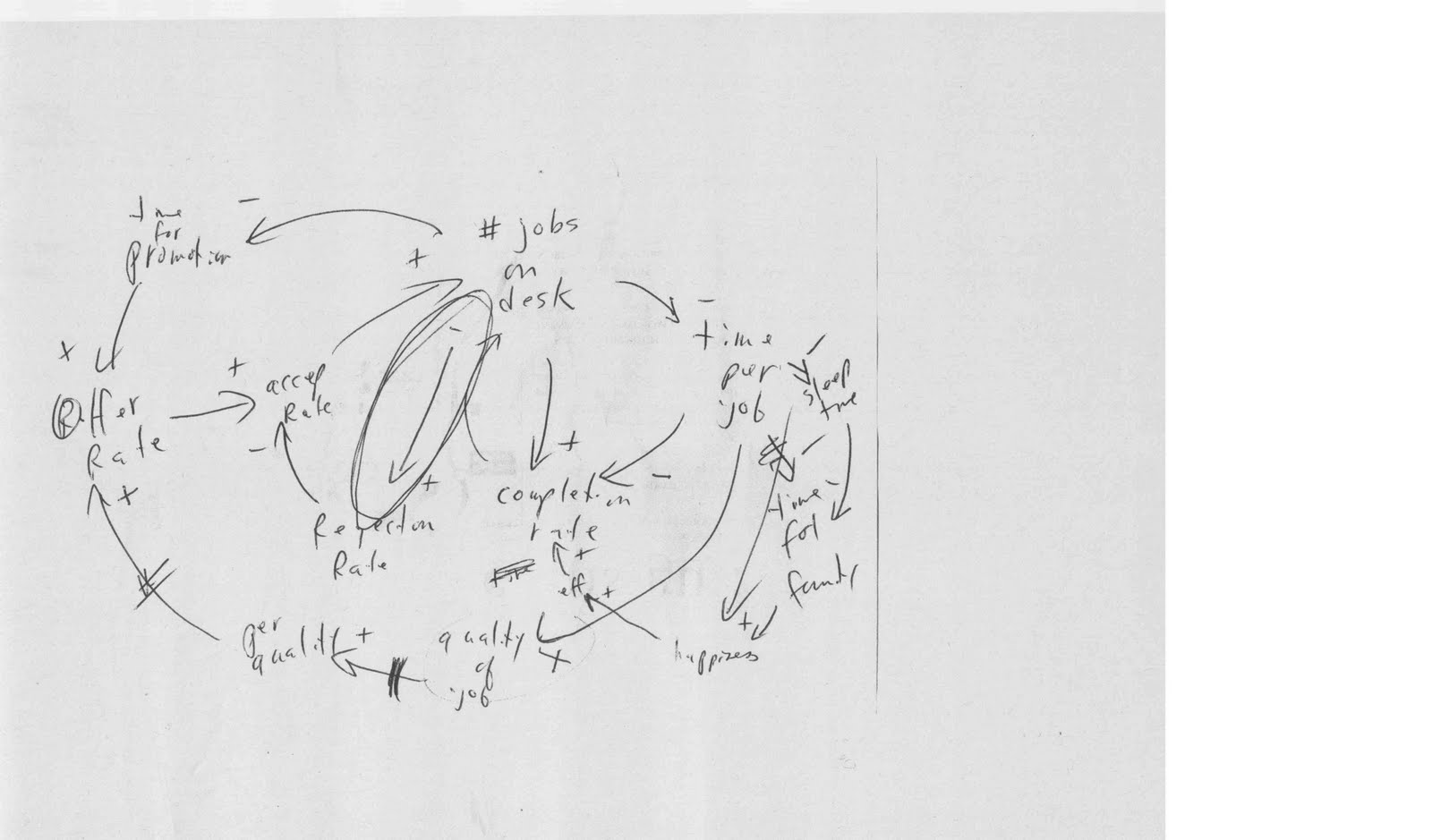
Drawn on a napkin during a recent dinner I had with a systems expert, you might have to look closely to see what this Causal Loop Diagram (CLD) advises. It considers some of the dynamics involved in working independently and wishing to balance work with family life. (Click on the image to enlarge it.)

It connects incoming work and project outputs, time for promotion and what you charge, and the rate of acceptance and completion of jobs. Central to this CLD is the link between reflection rate and number of jobs on your desk - the advice: make sure you always have enough time per job for reflection, and use that time frame as a filter to accept or decline a job (circled link in the centre of the diagram). It is tempting to be flexible on this when you are independent, but the knock-on effects of not paying attention to this important aspect can affect your quality, offer rate, time for family and happiness. A big conversation for a very small napkin...

Friday, April 16, 2010

Paper Free and Fast: Using Posterous for Workshops

I am at a workshop of the International Union for Conservation of Nature (IUCN) Commission on Education and Communication (CEC) in the Scottish Highlands (beautiful, yet not the best place to be when an Icelandic Volcano erupts.) CEC is one of IUCN's 6 expert Commissions, which are global knowledge networks of individual practitioners that contribute to the organization's conservation and sustainability work.

CEC aims to innovate; it is the learning and education-focused network within the IUCN system. New tools, social media, innovative learning has always been an area of exploration for the CEC. For example, in September 2007, it held a workshop on New Learning for the Arab Region at the Library of Alexandria in Egpyt where we looked at all kinds of social media and technologies. CEC makes an effort to test and model new tools and technologies in its work.

This meeting has been no exception, thanks to Posterous (self proclaimed as the "dead simple place to post everything"). We have been experimenting using Posterous as workshop support and it has been working brilliantly, making us virtually paper free, helping with simultaneous reporting, and providing practically instant feedback on group work and planning. Here's how we have been using it:

Set-up

  1. We opened the free Posterous account prior to the event and restricted the membership to the participants, closing inputs and accessibility to those attending.
  2. We sent out an initial email to participants with the URL and information on how to use that, so they had it prior to (if they had time) and upon arrival, and asked them to bring their laptops to the meeting.
  3. We arranged for wifi in our room and helped everyone get on, then we demonstrated Posterous on the first day and had everyone make their first post (posting is done through email message. e.g. post@iucncecmeeting.posterous.com.)
  4. Then we were off!
In-Session Use
  1. No More USB Keys - Presentation Support: There was an updating/reporting session of the beginning of the agenda where people reported on what they had been doing. We asked people to send their PPT to Posterous first (not before they arrived, just before they presented.) We had Posterous open on our screen in the front of the room, and people could either show their PPT through Posterous, or not and simply refer to it, so that people could look at it later. So no multitude of USB keys, no swapping computers, and no asking after the fact for people's slides sets or sending them around by email (or worse, printing them and handing them out).
  2. Instant Stars - Real time photos/videos: At ramdom points during the meeting, someone with an I-Phone (me in this case), took short videos asking people for opinions about the meeting, or talking about their inputs, as well as photos, and immediately sent them to Posterous as an attachment to an email for people to see and hear as the meeting progressed. They uploaded in a minute to Posterous and were embedded within the blog space, complete with title and tags.
  3. Nothing Lost - Group work immediately captured in different formats: No longer do people need to take flipchart paper home to type up group reports (or lose), nor stay up at night to do it. We had people in small groups type results directly into Email as they were being produced and at the end of their group work, post them to Posterous. We also had people photo their flipcharts and send the photo. You could even use your phone to video one of your group members talking through the flipchart and post that to Posterous. All this happens simultaneously. We also did our workplanning like this and it is the first time I have left a meeting where all the workplans are done and on the web, accessable to all, and forming some kind of "officialness" that helps tracking and generates commitment. (And can be tagged to organize)
  4. Meeting Done, Reporting Done (Collectively): If everyone is posting things as they are being created - including discussion products, workplans, photos, videos, and attachments, interesting URLs - when you walk out at the end of the meeting, the reporting is effectively done. There is perhaps a short tie-it-together synthesis, but all the documentation produced is already there.

We are just about to end our meeting, and no paper has been circulated, no flurry of USB key swaps, or promises to send around this or that. It's done, organized neatly on the simple Posterous interface, and we all have access to all the inputs, products and materials, to get on with once we return home. And we all contributed to it, through the simple means of email.

Monday, April 12, 2010

IUCN's Commission on Education and Communication: Exploring Social Media Opportunities for Environmental NGOs


This video link was sent to all of us attending the upcoming meeting of IUCN's (International Union for Conservation of Nature) Commission on Education and Communication. I'm proud to be the Specialty Group Leader for a Community of Practice focused on Learning and Leadership, a group which itself explores new learning approaches. I hadn't seen this video on the Social Media Revolution yet, and enjoyed its concise and in-your-face delivery. It rings true from what I have been hearing at the various conferences, from Online Educa last year, to the Social Business Summit last month. It will be interesting to discuss it with this group as I have not seen very big pick up of Social Media in the large international environmental organizations in Europe. Looking forward to getting some good examples to share after this meeting later this week.

Thursday, April 08, 2010

The End of Boring: Borrowing, Adapting, Mashing for Facilitators

I had a design conversation this morning for a one-day workshop that featured 10-15 participants each individually presenting project ideas, one after another. How do you make that interesting (after the third one)? Why not a pecha kucha or an Ignite (the tag line is "Enlighten us but make it quick")?

Both are presentation techniques with origins in the design and IT world which give presenters 20 slides on autochange at 15 seconds (ignite) or 20 seconds (pecha kucha), for presentations that total no more than 5 or 6 minutes. Both are now global phenomena, yet far from being household words. Pecha Kucha has a good website with samples, and here's one using Pecha Kucha for sustainability. Some good videos of Ignite presentations are on the Ignite Oreilly site, with more on Igniteshow).

These techniques shifts the whole emphasis refreshingly onto the story and the images and makes it much more fun and creative. One website said, "This is not your father's PowerPoint presentation." It all might sound intimidating, but even bad ones are really good (or at least funny and only last 5 or 6 minutes anyways.)

So there are new ways to do presentations, there is also new software for that. Lizzie wrote recently in our blog about Prezi, and what about Keynote that I recently heard enthused over by a super smart 11-year old attending a workshop with his mother (a reaction to the slideset no doubt). In fact, there are 40 listed in wikipedia under presentation programme from AdobePersuasion to VisualBee. It probably has never crossed your mind to try anything but PowerPoint, but if you only have 6 minutes to present something or if you want to get people's attention in a long series of presentations (or just a long day), it might be worth trying a new format.

Or what about a completely new format for the workshop itself (or at least Day 2)? We have written about using Open Space Technology in the past (see our post Open Space for Conversation and Eating Croissants) and how that technique helps to organize and support learning. There are a range of Unconference techniques that are being used (many again conceived in the IT sector, and often focused on sparking innovation and creativity enhancements). I heard at last year's Online Educa about the FooCamps and BarCamps that started 5 years ago and promoted as "user generated conferences". Again the content is brought by participants, and schedules are generated by those with ideas to share and develop with others. A typical FooCamp schedule board looks like this (lots of intriguing titles - I like the scribbled out session called "Howtoons" - I would have gone to that one.)

Again, the objective is to provide those people who seem to have at the top of their Job Description: "Go to Meetings", with a new and refreshing frame. A 2006 article about this was explicitly headlined: Why "Unconferences" are Fun Conferences: Unconferences - meetings organized on the Web or on the fly - are becoming the no-b.s. alternative to industry gabfests. The mention of "organizing on the Web or on the fly" comes from the fact that many pride themselves in being organized in less than a week, and are "evangelised" or promoted using mainly web tools. Some recent social applications include CrisisCamps held to promote relief efforts for the Haiti Earthquake. They are also short, with one day or half day formats, and a panoply of parallel, one hour sessions. (And perhaps also a driver for the creation of Ignite or Pecha Kucha type presentation formats).

All this is still a lot of talking. What about having a whole session where no one talks at all? Maybe something like a Dotmocracy session could be a calming and still productive way to spend an hour after lunch. I have seen this done for evaluations, but not as it is described here as a way to gather inputs on a specific idea. If you look at the template, it is obvious how you can use this for brainstorming, and you don't even need those sticky dots that can be a pain to cut anyways. This looks like something that could also work with very large groups, similar to the Camps and Pecha Kuchas described above.

Maybe I am oversensitive to boring. And yet, there are productivity gains to be made from spicing things up, speeding them up, tapping into enthusiasm and creativity, and cross-sector learning from the IT sector - not just from their methods, but also from their eternal willingness to borrow, adapt and mash things up. And for Facilitators, boring is not what we want to pop into people's minds when they think of our work (I was going to say "is the kiss of death" but that sounded rather unappreciative). At least there is no shortage of intriguing pathways to explore, these are just a few, if we want to help try to bring an end to boring.

The Climate Change Playbook: The Making Of

Can you imagine getting an invitation to a workshop that has as its main goal playing 20 games? Would you go?

Those invitations went out a few weeks ago, and we had a very good response to a test workshop we held in Bonn aimed at playing and discussing 20 games that deliver messages around climate change, using systems thinking concepts.

Dennis Meadows, Linda Booth Sweeney and I have been working together for the last few months to take 20 games from the original Systems Thinking Playbook, written by Linda and Dennis, and adapt them for climate change learning. That process is more complicated than you would think! We each have 6/7 games we are working on, originally selected from a larger number in the original book, and folding in climate change messaging is like a dance. You need to deeply understand the dynamic of the game and what happens (or could happen if adapted). With that in mind you need to move your focus over to the climate change world and consider related dynamics, whether in the natural or human (political/economic/social) systems. Then it is an iterative thought exercise to bring those two elements together so that they work elegantly together in the end and are not too contrived.

Sometimes it is very obvious how the game and the key climate change learning points link and relate. And sometimes it is like doing sudoku in your head. It took us from 6-8 hours per game (so far) to make the connection strong enough to use.

There are different ways to make this link (between the game, climate change and systems thinking). You can change the frame of the game to put people in a climate-related context while they play. You can use the debriefing questions to guide people in making the link with the climate debate or dynamic. You can put in data, an observation, quotes from climate specialists, or elements from the news and current events to anchor the game to climate change. Or in some cases you can play the game and ask people what the link is (of course you need to have an answer too in case you draw blank stares).

We tried all of these approaches in the test workshop for our 20 games. They all worked in different ways. Of course, we were fortunate to have a room full of climate and games specialists, which our partners from GTZ (GTZ Climate Task Force) had invited, to play through the games, analyse them and give us great feedback to further strengthen the climate learning.

Our agenda was simply a list of games, and our table of contents will be that too. So we wanted to create a of narrative that held them together, a thread that helped facilitators and educators understand how they might use them. We created two organizing principles for the games day, which we will also use for the book.

First, we used a systems "map" as the organizing principle. This was a stock and flow diagram with stocks such as CO2 in the atmosphere/ocean, heat in the atmosphere, and ice cover, and flows like CO2 emissions, heat in, heat out, ice melting, etc. We had that up in our workshop room and positioned the message from each game around these elements (sometimes before and sometimes after the game). It was not too much of a stretch to map out the lessons from the games - some of which were about natural aspects, and some were more human system dynamics with communication messages, collaboration and competition, etc. We found it useful, and people appreciated this signposting to pull the games together.

The second way of clustering the games was by use. Some of the games are mass games which can be used for large audiences, who might be sitting in an auditorium. They can be used during presentations and speeches to make points, and people can play them sitting in their chairs. Some of the games are demonstration games, which a small number of volunteers can play for a larger group of say 35-50, and the lessons will become obvious to both those playing and watching. The third type of game is a participation game which everyone needs to play to draw the learning, so this would be for a typical workshop size group of 10-25 people.

We also used materials as a criteria for selecting the games initially, not wishing to have any of them be too materials/equipment intensive. In the end, our games kit included: Ropes, balls, coins, paper cups, markers, scrap paper, pens, hula hoop (collapsible), ball of yarn, a newspaper, and a rubber chicken. (I always worry about a customs agent opening my bag in a crowded place.)

We spent 8 hours that day playing our games, each of which run from 2 to 25 minutes in length. We used a 10-minute plenary discussion after each game to identify with the participants ways to strengthen either the game mechanics or the climate change frame and lesson. We also used a Games Review Sheet, so that people could note any thoughts they had during the day individually. I came away with over 50 pages of notes and ideas!

We are now integrating the ideas, revising our games and their write-ups, each of which is from 3-5 pages and written for the facilitator. There is still plenty of writing to do to produce the book and we hope to finish in July. It never made sense to sit at our desks and write games. This test workshop was an important and useful step in the process. There is a saying in gaming that you have to test play a game 10 times before it is really good. We have all played these games dozens and dozens of times in their original format. But they're different now in some subtle and important ways, so this was an important step in "the making of" The Climate Change Playbook.

Monday, March 29, 2010

Search Revolution: Social Media Can Save You Time (With a Little Help from Your Friends)

Many people say they don't have time for social media, are not on Facebook, can't follow the flow of Twitter, don't keep up with LinkedIn, never tried a ning, would never bother with a blog. They have too much email, spend too much time on the internet already looking for things; they simply don't have time to get into these new information streams. "Time wasters" they say - "Where do you find the time?" they ask.

Would they ever believe that using social media might actually save them time? This is what the experts are saying, and they point to the coming revolution in Search.

I recently went to the Social Business Summit in London, and this was one of the big discussion topics - the change in how people will search for information in the new social media environment. It was predicted that in 5 years, Google would no longer be the way we get our information. Google would be out, and our Friends would be in.

Instead of googling something and getting either 1,300 pages of nothing good for too specific searches (e.g. "lighting shops" + my village in Switzerland), or 11,300,000 pages for searches that are too broad ("light shops Switzerland"), people will increasingly use their social media networks of friends and followers to get the granuality of information they need to answer their questions, fast (e.g the Facebook Group that some women in my village set up called "Move and Improve" that shares information on home renovation and local vendors, in English no less). I will never google local electricians again.

Along with this, out goes celebrity advertising. We will no longer want to know what kind of watch to buy from Tiger Woods, we will go directly to one of our friends whom we know has done recent research in watches locally (because she is writing about it on her blog). Now that we have so much more information on our Friends and their preoccupations, whether through their Fan Pages or the discussions they start on LinkedIn Groups, or their incessant Tweets on one topic or another, we will begin to use these more personal filters, much closer to home and our interests, to shortcut our own lengthy research through broad search pathways. Our Friends rate things, they vote, they share their favorite links, videos, photos. And, because of our personal connection, if we ask them a question, they will probably respond.

And our Friends are not only social, we have our Plaxo's, our LinkedIns, our nings, our professional networks with their Web2.0 platforms where we can ask for and get work-related information, from those whom we know are experts in our topic-of-the-day.

Our Personal Knowledge Management Systems will become a connected web of Friends whom we know personally (or at least virtually), and where we will go for all kinds of information. They will become our Search engines of the future. Hours and hours of Google out, a quick check with our Friends in.

Thursday, March 25, 2010

Preparing a Presentation? Read this Praise for Prezi

When preparing to give a presentation, how do you get started? A list of bullet points? Opening a PowerPoint and jotting down a key message for each slide? Browsing your folder of favourite images to highlight your ideas? Or perhaps like me: with a large table, a big blank sheet of white paper, and an array of colourful pens, sketching out visuals, words and key symbols, with circles and arrows highlighting the connections and helping navigate about the page?

If you are like me, then you’ve probably struggled with the transition from your sheet of beautifully animated paper to a series of PowerPoint slides. All of a sudden, the dynamism, the creative flair, the energy seems sucked right out. Despite your best efforts, clicking through the slides you are disheartened by the linearity, and frustrated by the challenge of retaining the contextual frame for each of your interestingly connected points – a frame which leapt from your one pager. If this speaks to you at all, I have just the presentation tool you’ve been waiting for: Prezi. Check it out here: www.prezi.com. It’s very intuitive to use, and makes a really refreshing change. Systems thinkers especially – this is absolutely for you!

Let me know how you get on.

Friday, March 19, 2010

Next Generation: Climate Change Preparedness Meets Social Media

I am just about to comment on a PPT presentation that a couple of elementary school students made about what to do in case of a tornado (Among other things: Seek shelter under a sturdy table in the basement. If there’s no basement available, go to a first floor, small bathroom opposite of the tornado. Did you know that?) A teacher in Pickerington, Ohio (population 9,792) is running a timely project with his class on extreme weather conditions, what causes them and what to do.

But they aren't making posters and standing up in front of their class (well, they might be doing that too.) They are doing their project using social media, so their learning becomes the learning of many. The students are doing their reports on tornadoes and hurricanes and the like in PowerPoint (with very nice visuals and lessons in word count that any good conference presenter should know). They are posted on a website in blog format, and they're inviting comments through word-of-mouth viral spread from all over the world. To incentize interaction, they are giving the teams with the most comments, and with the comments from the furthest away, a prize. (Thus the reason I was called in I guess - an Ohioan who cares about tornadoes, based in Switzerland.)

The comments they are getting are interesting too, lots of positive feedback on their delivery, extra information and geographical comparisons from people who live far from their small mid-western town. No amount of classroom interaction would get them that.

I'll put the link here, just for now, in case you want to go and give them some information on extreme weather events from your part of the world. As our climate changes and social media is just the way things are done, these kids will be doubly prepared!

Saturday, March 13, 2010

An Amazing Group of People: Have a Party, Play a (Social Learning) Game!

Last Friday night I went to a birthday party that a friend of mine threw for herself. It was a nice group size, 10 women, that she had drawn from various of her different social groups. Because of this diversity, everyone knew somebody, but no one knew everyone, except for her. So she decided to play a game, as a way to bring the group together and get conversation going.

At the beginning of the party, in front of the fireplace, we all sat together searching around for things to talk about with one another, work, school, family, our origins - the usual conversation suspects. Going on in parallel, as people came in, my friend would hand them a small piece of paper and a pen and asked them to write something about themselves that was interesting and that the others might not know about them, and give it back to her. The first reaction in almost every case was, but I haven’t done anything interesting! Stumped, people held on to those papers until the very last minute when they would finally write something down and hand it back.

My friend put all the papers aside as we started dinner, and indeed there was one conversation going at one end of the table about school, and another at the top of the table about another topic, and a few people like me in the middle trying to listen to both, but not quite managing to jump in. At that point, getting our attention, our hostess announced that we were going to play our game. She told people that she was going to read one of the statements and that the table would have to guess who had done what. People laughed nervously at first, apologetically restating that they had simply not been able to think of anything very interesting. Then we started, my friend began reading the statements one at a time….and... within minutes we were in an uproar, bursting with laughter, incredulous with disbelief!

This amazing group of people had been all over the world and done remarkable things – someone was being quietly paid to go by train every Friday up to Gstaad one of the world’s poshest ski resorts to teach flute lessons to a couple of students living there (we never found out who they were), one person had competed nationally in Latin Dance competitions and danced in stage shows, another person had a long list of movie stars that she had bumped into (some literally) in New York City and great stories to go along with these, someone else had worked as a forensic DNA research specialist in Costa Rica and mesmerized us with the story of CSI-like drug-related murder that she had worked on and helped solve.

What a completely different conversation we had after that! No more super small talk, there was no going back.

With that small game, not only was the conversation brought together, giving us a shared experience, it also produced an opportunity for us to connect with each person individually, making finding further conversations topics a breeze. We also quickly went to much deeper quality connections, and more memorable ones. I will probably never forget these things I learned about these women, and when I see them next I will be able to reconnect with them in a much different way thanks to this relationship building shortcut. It was a service to social learning too, knowing more about what people do and can do, if anyone asks me for a good music teacher, I know where to send them.

This game also created lots of good energy, and that relaxed people who did not know one another. It helped us share things about ourselves that we are proud of, but that would have never come up in a normal cocktail party conversations (like taking blood samples from dismembered corpses), and gave people a real sense of accomplishment; we all left feeling much more “amazing” than when we arrived. Remarkable what a little social learning exercise can do!

If you want to do it yourself, here are the game instructions:

Materials: Squares of paper (1 per person – make sure they are all the same), pens, a bowl to put them in.

Time: 3-4 minutes per person playing.

Game steps:

  1. As people walk in give them a slip of pepole and ask them individually to write down one thing about themselves that is interesting, and that people in the room may not know about themselves. Don’t give them any examples (they won’t really need them), but you can ask them to think about their past, their home or work life, etc. Tell them NOT to write their name on the paper.

  2. Collect the papers and fold them over; put them in a bowl or hat.

  3. During dinner, or when everyone can listen and see you, announce the game and pull the first paper out of the bowl. Tell the person who wrote it not to announce themselves until someone has guessed, or the group is stumped.

  4. Read the first paper, and start the guessing! When the person has finally been guessed, ask them to talk a little about their experience, ask about context, or for a short story (this is where the good stuff comes) and let the group focus on that person for a time before going on to the next paper.

  5. People will naturally keep track of how many they guessed correctly – if you want you can have a small prize for the person who got the most correct.

Variation: In a workshop setting I use this game just after lunch or on Day 2 or 3, as on the first day if people really don’t know one another at all, they will not be able to guess. If people do know one another somewhat, you can move the game up in the agenda. With a larger group, I mix up and number the cards, and then at the start of the game, I ask people to take out a piece of paper and number it from 1 to 15 (the number of people playing), and I read through all the papers first with no out-loud guessing, simply asking people to write down their guesses. Once I have completed one reading, I go back and read them again in the same order (thus the need for numbering!) and this time, we guess and then move into the wonderful sharing and storytelling as people get to tell more about what they can do and know.

Whether at a birthday dinner or in a workshop, you just never know what a gold mine of experience, stories and knowledge you have with you in the room, until you ask, and then let the evening be naturally taken over to learning about your Amazing Group of People.

Thursday, March 11, 2010

The Time it Takes: A Learning Practitioner's Lessons on Time

When I worked in an NGO environment, we didn't ever really notice how long it took to do things. We experimented very briefly with time sheets (about a month) and found that tricky and even a bit boring to note down how every 15 minutes was spent, mostly because there was no real incentive to do so. We did do some internal billing, so on a project basis from time to time we kept track. But even in these projects it seemed that planning meetings were so frequent and long and often multi-topic, that after a while, it didn't make sense to try to allocate that time. So we never got a good sense of how long it took to do things.

Now that I am working independently I have all kind of incentive and a direct imperative to be scrupulous about the time it takes me to do things. I now have a very elaborate system that I use to keep track of time and the result of this kind of observation is very useful. Not only is it essential for billing, but it starts to show patterns that help immensely to make more accurate projections about how long things will take (useful both in the proposal and negotiation stage of projects). That of course doesn't mean that the other party has the same belief in your figures that you have, but at least you will know how close the time allocation is to what it will actually take you, and how much you might potentially be doing pro-bono.

I feel like I am prudent in how I use my time; indeed, many simultaneous commitments (work and home) and multiple ongoing projects force me to be most economic with it. Plus I have been very deliberate in my collection of reusable learning objects (RLOs-templates, activity briefs, job aids, games, etc.) which help me pass on this benefit in time savings from past investment in documenting things. Since I started keeping records nearly a year ago, and 26 projects later, this is a sample of what I am noticing about how long things take:

  • Writing a blog post (from first letter to final publish): 1 hour
  • Writing a proposal with a budget: 2 hours
  • Developing from scratch a 90-minute "training" session (part presentation/part group activity- including consultation, revisions, preparation, & delivery): 10.5 hours
  • Preparing an individual coaching programme (design, preparing/holding 6 sessions): 25 hours (3+ days)
  • Collaboratively developing a training programme curriculum (multiple events with companion 370-page participant's handbook - writing through to final proofing for printing, with some inputs coming from other sources): 172.5 hours (21.5 days)
  • Developing a 1-day facilitated planning workshop for a new client (design, consultation, and fully briefing the facilitator who delivered it): 16.75 hours (2+days)
  • Developing a 1-day facilitated training workshop for a university client (with a separate content expert providing central input, including delivery): 17.5 hours (2+ days)
  • Developing and delivering a 4-day facilitated partnership-building workshop (with multiple presenters, generative dialogue and strategy component): 64.25 hours (8+ days)
  • Design input for a 3-day conference for 300 people (including 2 parallel workshop designs and delivery, plenary activity design, coaching for other workshop presenters, plenary moderation and delivery): 80 hours (10 days)
  • Strategic Review and Advisory Report for a large training department (consultation, 6 day site visit for interviews with travel, online survey, web2.0 query and social media scan, preparation of 70-page report of feedback and recommendations, all original writing): 128 hours (16 days)

I could go on. What I notice is that time expands a little for new clients (trust building, multiple revisions, many conference calls), and for developing new materials or new approaches for known topics. Collaborative work obviously takes longer as there are many more partners and opinions to take into consideration, and more revisions as a result. Larger scale of an event also means more time as there are more delivery agents that need coordinated, coaching, briefing, etc.

Report writing is harder to judge, and it takes longer than you imagine, not only for creative delivery but for editing and layout. For a project that includes part original writing and part working with other sources, like creating a participant's manual, my past experience shows I can produce about 18 pages a day (as a ratio, that includes all the consultation, revision, proofing, etc.). For completely original writing much less: about 4 pages a day, depending on how much data collection is needed. I am doing a project right now that included 16 interviews to produce a 25 page highly synthetic how-to document plus annexes, and this is going to take more like 15 days (or 2 pages per day ratio.)

These things take time, and the more accurate you can be in capturing this data, and learning what makes creates divergence from your standard ratios, the clearer and more accurate you can be in your discussions with partners. Then you can choose your options, based on experience and learning about the way you work.

What are you learning about the time it takes? (and indeed, this blog post took exactly 1 hour, practically on the dot!)

Monday, March 01, 2010

(Almost) Foiled by a Doublet: Playing Around With Instructional Games and Puzzles


GROUP
TROUP*
TROMP
TRAMP
TRAMS
TEAMS


I couldn't believe that this worked, on my first go, after reading Brian Remer's puzzle instructions in this month's Thiagi Gameletter (TGL-Seriously fun activities for trainters, facilitators, performance consultants, and managers).

Brian calls this instructional puzzle a "Doublet", and cites Lewis Carroll (of Alice fame) as its originator. In Brian's description of this puzzle he went from WORK to PLAY and APE to MAN in four to five one-letter changes. I picked my two words (thinking about a teambuilding request I received today) and wondered if I could go from a Group to a Team as easily. It worked beautifully, and I could immediately imagine how this could be used as a teambuilding exercise, or part of a visioning or strategic planning opener. (fyi, Brian Remer writes a thoughtful monthly e-newsletter from his Firefly Group - spark your passion for continuous learning is his tag line.)

(Imagine my dismay later when I discovered that I had spelled troupe wrong! More on that anon.)

There is also a great game in the March TGL called "Destination: Innovation" by Dimis Michaelides (I found his bio on an intriguing website called Facilitators Without Borders) that involves an airfight of paper airplane ideas and flying paperwad obstacles that I am eager to try at one point (I also wrote about a paper airplane idea in a previous post called Keeping it Fresh about innovating on workshop exercises.)

Ah, I always get excited by new games! A Facilitator has a faithful set of these kinds of frame games, tried and tested, and whenever you get a new one, or a new idea for one, you just can't wait to try it...

*TROUP - UK Acronym for: Time to Restore Our Utility Poultry (no joke!) (Phew, saved! while I come up with another one that has all the words spelled correctly!)

Wednesday, February 24, 2010

Look Behind You! The Webinar Facilitator's Non-Technical Checklist

I am currently in the middle of an online sustainability learning project that includes facilitating a number of webinars (10 to be exact) for a big multi-national company with staff based all over the world. For this project, I am one of a distributed delivery team from AtKisson Associates which is located in North America, Europe and Asia, because every module features virtual events in all these three regions. Webinars are the main "person-to-person" component of this programme, so they are the anchor of the learning process (and they need to be good!)

I've worked with online learning in the past, such as Horizon Live (an early webinar-like platform, but with no video input or participant audio interactivity possibilities), and even earlier with CD-based, email-mediated distance learning. This is the first real experience I have had faciliting webinars that have so many bells and whistles. For this project, we are using DimDim (http://www.dimdim.com/), which provides the slideshow, chat function, audio for presenters, recording, private chat, whiteboard, video link for the facilitator, and more. For these webinars we are adding the audio interactivity for participants through a call-in conferencing number, which I access by skype.

Needless to say, the first time I facilitated (after a trial run of course) it took me a while to get my head around all the moving parts of this delivery system. At any one moment, I could be presenting slides myself or advancing the slides for a presenter, tracking and answering chat questions, watching myself on video, private chatting to the technology support person in Stockholm, looking for my skype mute button, while trying not to cough or type too loudly, and so on! AND you have to pay attention on top of it, because you are facilitating after all and may need to bring a point back into the discussion later on. (Don't worry, it gets easier each time to do so many things concurrently - for the video game generation this is probably no big deal.)

I've participated in three so far, and during last week's webinar, anything that could happen seemed to do so technology-wise, testing our creativity, resilience, and Plans B and C on the spot. This morning I facilitated another one, and again, there were multiple, delightful surprises with Dimdim and even Skype at various times within the length of our one-hour event.

Because weird technical things happen during these online sessions, combined with the fact that I need to be fully present in terms of my attention, I find I need to prepare much more than I would have ever imagined prior to this one hour of sitting-at-my-computer facilitation. As a result, I made this checklist for myself - a non-technical checklist for facilitating a webinar. It considers things that I have noticed, about my computer, the content, my environment and myself. With these things ticked off, I am ready for (almost) anything - or at least I am not distracted by things I could have anticipated myself!

Non-technical Webinar Preparation Checklist:

My Computer
There are a number of checks that need to be made on your hardware that is not connected to any particular webinar package. For example:

  • (I assume that I have already tested the webinar package and accepted the webinar invitation.)

  • Close down all competing open programmes that may be running, and shut down any open documents, except exactly what is needed: internet and skype - (all those extraneous open windows, half written email messages and blog/Twitter/FB/LinkedIn pages need to be shut down/saved)

  • Check that the mute button on the computer is not on.

  • Unplug the extra monitor, stick to one (nothing more maddening than having to look two places at once on top of everything else).

  • Check that headphone/microphone cables are in the right jacks.

  • Make sure you have enough money on your skype account.

Content

Whether you are the presenter/facilitator or facilitating another speaker, you will need to be able to anticipate the next slides and have your discussion questions/notes queued up and ready to go.

  • Have a copy of the printed slide set in handouts (6 per page - latest version of course).

  • DON'T staple (it's hard to turn pages with one hand on your mouse/keyboard/pen).

  • Print slides one sided (as an exception to the rule - turning pages is also noisy).

  • Make sure the pages are numbered legibly (so easy to keep in order as you slide them across).

Environment - Ambient Noise

This is critically important, whether you are in a cubicle or a home office - the latter can be even more unpredictable, as is my case. As the facilitator, you have your audio on 99% of the time, so any kind of noise is a big issue.

  • Turn your cell phone on vibrate (even if it is across the room).

  • Move any other phones like landlines out of the room (they tend to all go off at the same time as someone tries one, and then when you don't answer it, they try the other).

  • Put a DO NOT DISTURB sign on the door (with the time frame of your call).

  • Lock the door.

  • Tell anyone in the house with a penchant for spontaneous hoovering to wait until after your call (nicely so they don't decide that they never want to hoover again).

  • Let the cat in (especially if it likes to sit outside the office window behind your computer, meows loudly, has incredible persistence and suffers from bad timing).

Environment - Your Office

Managing and preparing the space around you is incredibly important and easy to forget until you are right in the middle of your webinar and shuffling through stacks of stuff looking for a pen.

  • Clear the desk from EVERYTHING except your slideset, one note paper and pen (everything else will be in your way at some point).

  • Add tissues (seasonal)

  • LOOK BEHIND YOU! (Use your video for this -move dead or past-prime plant, coffee cups, extraneous rubbish, strange photos, from view behind you).

  • Straighten up any pictures on the wall or put up some visual interest behind you (NOTE Business Idea: Backdrops for webinar presenters that cover messy office spaces and add pleasing, unfussy visual interest. Swiss alps, Tibetan monastery, Carribean beach view.)

You

You and the slideset are the only thing that people are seeing/hearing for an entire hour, have a heart and think about it from their point of view.

  • Think about what you are wearing (top half only). Can you add colour, pattern? (Same consideration as for a stand-up facilitator, but from the waist up.)

  • Comb hair

  • Apply lipstick (or increase your video contrast controls - only half kidding here - nothing like a bland, washed out presenter.)

  • Do you need coffee or water on hand?

  • Don't forget the washroom (you won't be nipping out during the group work on a webinar)

When I first started this checklist, I couldn't believe how many things needed to be considered prior to facilitating a webinar. I imagined that if I had my slides prepared I could just sit down, plug in and present.

But there is definitely more to it than that - especially if you want to be able to concentrate on the content and dynamics in a virtual environment where you are getting much less sensory input. In this kind of setting many of your facilitator senses are cut off or drastically reduced -you have no sight to speak of and certainly no visual cues on how people are feeling and following. You also have very little hearing, as most of the time participants are on mute until they want to speak, and certainly none of that sixth sense that helps a facilitator in a face-to-face setting read her participants in order to know how and when to engage them and adjust the process to fit their needs.

So for webinar success, increasingly a feature of a facilitator's work, you need to anticipate and prepare much more than you might expect. Make your own checklist or add to mine - what have I left out?

(For the checklist without the bla, bla, blah, click here: Webinar Facilitators Checklist)

Monday, February 22, 2010

The Changing Face of Learning - It's Here!

I have just finished writing the report for a very interesting study aimed at a reconceptualising a large organization's Training Division into a Learning Division, and exploring what that might mean for its structure, task orientation, skill sets, and correlated processes and policies. It was a fascinating exercise in both retrofitting and growing new functionality in the division, all the while maintaining ongoing delivery to support the institution's goals and objectives.

My report had a number of suggestions which were very much informed by all that I am seeing and experiencing in my work with various organizations and teams, and hearing in related communities of practice, about the changing face of learning. The first three suggestions were:

* Moving from Training to Learning
* Blending Formal with Informal Learning
* Exploring New Learning Technologies

Today, synchronicity (and a good network) provided a number of useful resources that capture these trends, and help substantiate these suggestions in a succinct way; so I thought I would share them here (on our 300th blog post!).

The first was an interesting LinkedIn slideshare called The Changing Face of L&D which was posted recently by Jane Hart from the Centre for Learning and Performance Technologies and Jay Cross' Internet Time Alliance. This was a presentation to the Learning Technologies 2010 conference in London, and shares in a neat visual way how the social media revolution has precipitated a social learning evolution. (Thanks to Michael Randel for sending that!)

Then I read today's Chief Learning Officer e-news, which featured an article by Agatha Gilmore titled "Tweet This: Creating a Social Networking Strategy" which helps organizations reframe their question from "Should we address social networking?" to "How will we address it?" It also offers some good suggestions for CLOs on the policies that are needed to make this addition to workplace learning work best.

And finally, a spirited discussion on the LinkedIn Chief Learning Officer Group mentioned Josh Bersin's December 2009 white paper on "Enterprise Learning and Talent Management 2010: Predictions for the Coming Year" (which I just read today), which includes 12 predicted strategies for organizations this year including, "We are shifting our focus from e-learning to We-learning," and "Learning Management Systems will continue to evolve into talent and information learning platforms, and Collaboration Systems will become hotter. Other learning tools will continue to grow."

There is a lot of noise in cybersphere about all this, and (full disclosure) I am definitely an advocate. If it is indeed here, now there is definitely some work to be done in our organizations and businesses to think very practically about what that means for our existing work in capacity development and learning. Thankfully these do not sound like distant, frontier concepts anymore. They are right on our doorsteps, waiting to be invited in.